
16.如何设置外接显示屏HDMI模式
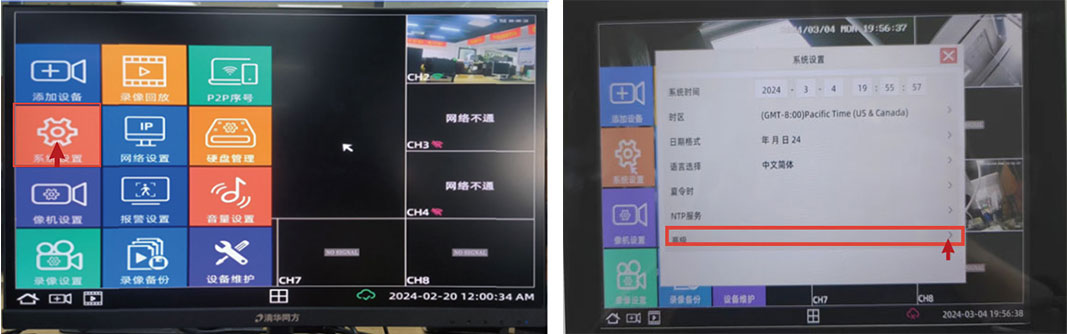
①打开NVR系统端桌面,点击左下角的”主页“弹出菜单栏
②在菜单里找到“系统设备”,点击进入
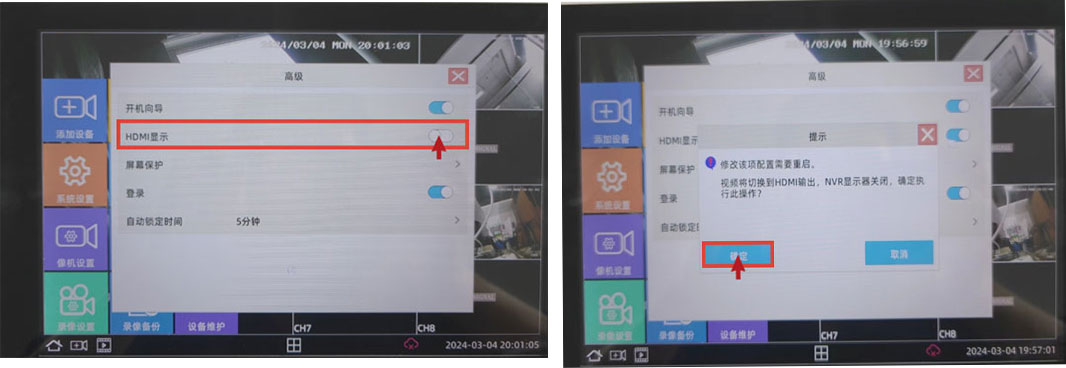
③找到“高级”,开启HDMI,默认是关闭状态
注:开启HDMI模式后主机关闭,需要外接显示器重新启动主机。
Business Email:sales@sricam.com Supports Email:support@sricam.com
Add: The building 40, 5th Industrial Park of Huaide Cuigang,Fuyong Street, Bao’an, Shenzhen, China

 简体中文
简体中文 Italia
 Français
 Español


