13.How to set up app alarm push
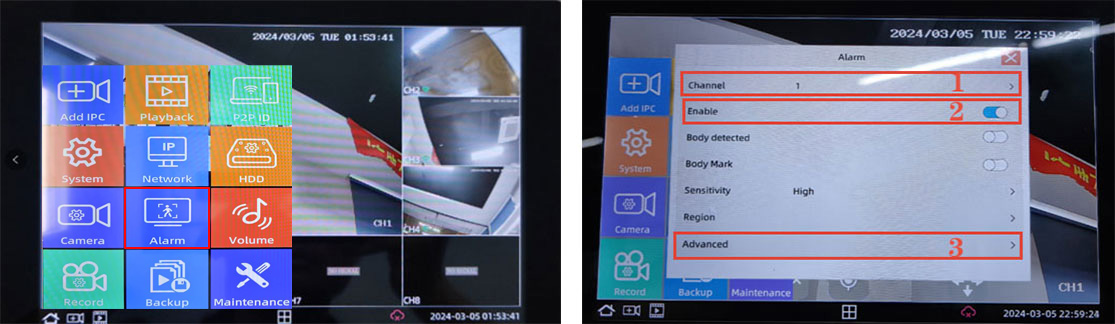
①Open the NVR system desktop and click "Home" in the lower left corner to pop up the menu bar
②Find "Alarm Settings" in the menu bar and click Alarm Settings
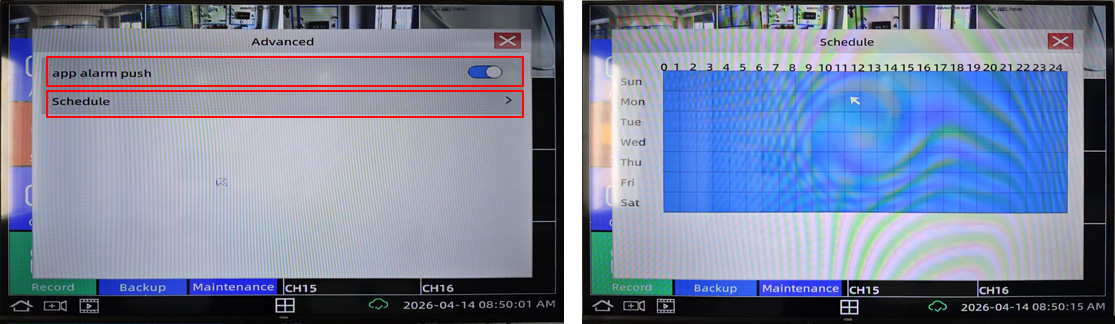
③Enter alarm settings and click "Advanced" to enter the advanced interface and choose to turn on app alarm push
Note: In the "Schedule" section, Blue indicates that the machine is in operation, and gray indicates that it is not in operation.
Business Email:sales@sricam.com Supports Email:support@sricam.com
Add: The building 40, 5th Industrial Park of Huaide Cuigang,Fuyong Street, Bao’an, Shenzhen, China

 简体中文
简体中文 Italia
 Français
 Español